
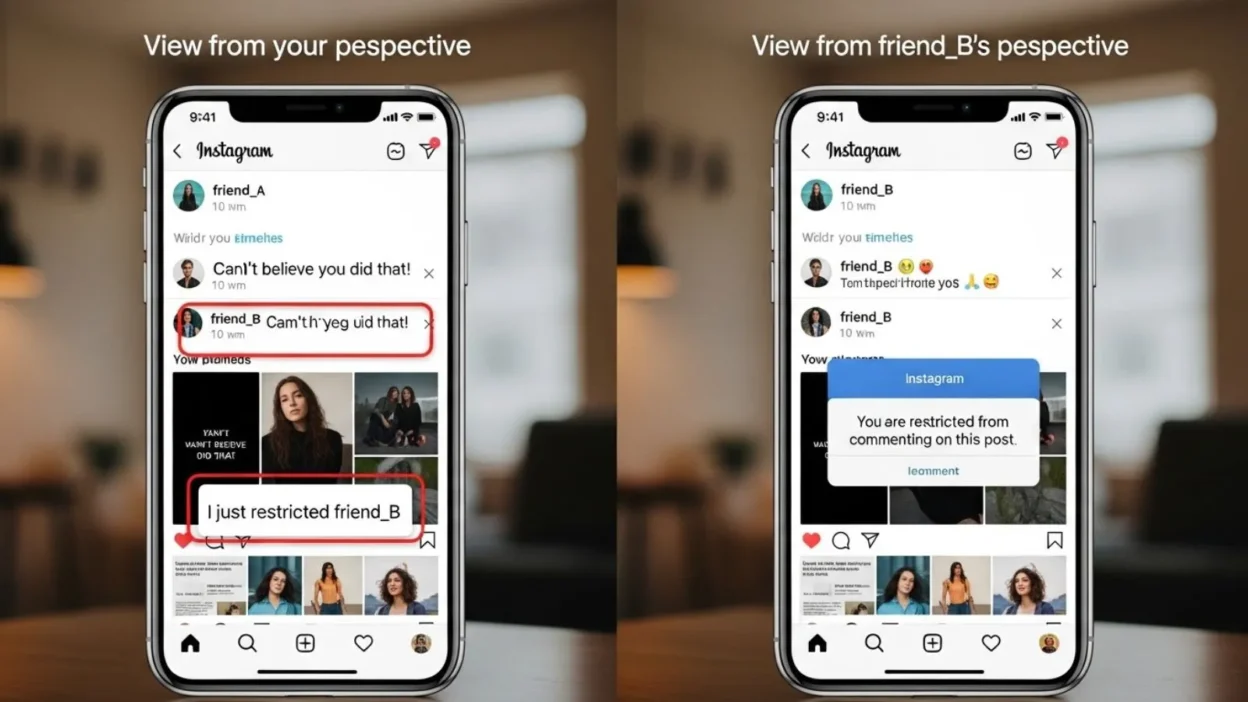
Social media platforms like Instagram give users many tools to control their online interactions and protect their privacy. One feature that often confuses people is the Restrict option. Many users wonder what happens when they restrict someone and how it affects comments, messages, and profile visibility.
If you’ve ever dealt with unwanted comments, spam messages, or uncomfortable interactions, this feature can be very useful. Understanding what restricting someone on Instagram does can help you manage your account more effectively without creating unnecessary conflict.
Unlike blocking someone, restricting is a quieter way to limit how a person interacts with you on the platform. The restricted user can still see your posts and profile, but their ability to communicate with you becomes limited.
What Does Restricting Someone on Instagram Mean?
Restricting someone on Instagram is a privacy feature that allows you to limit a person’s interactions with your account without blocking or unfollowing them. It was introduced to help users manage unwanted attention, spam, or negative comments while avoiding direct confrontation. When you restrict someone, the person can still view your profile, posts, and stories, but their ability to interact with you becomes limited.
The main purpose of the restrict feature is to give users more control over their social media experience. Instead of blocking someone—which completely removes their access to your profile—restricting quietly reduces how much influence they have on your activity. This makes it especially useful when dealing with online harassment, annoying comments, or people you don’t want to interact with frequently.
One of the key changes is how comments are handled. When a restricted person comments on your posts, the comment will only be visible to them unless you choose to approve it. This means other followers won’t see the comment unless you manually allow it. This helps prevent negative or inappropriate comments from appearing publicly on your profile.
In addition, messages from restricted users are automatically moved to your Message Requests folder. They cannot see whether you have read their messages, and you won’t receive the same notifications you normally would. This gives you the freedom to ignore or respond to the message whenever you want.
Overall, restricting someone on Instagram provides a discreet way to control interactions while maintaining your online privacy and peace of mind.
What Happens When You Restrict Someone on Instagram?
When you restrict someone on Instagram, several changes happen that limit their interaction with your account while keeping things discreet. Unlike blocking, the person won’t know they’ve been restricted, making it a quiet way to manage unwanted interactions. Understanding these changes can help you use the feature effectively.
Hidden Comments
One of the most noticeable effects of restricting someone is how their comments are handled. Any comment they make on your posts will only be visible to them. You can choose to approve the comment if you want it visible to everyone else, or leave it hidden. This feature allows you to control negative or unwanted remarks without creating confrontation.
Messages Move to Message Requests
Restricted users can still send you messages, but these are automatically sent to the Message Requests folder. You won’t receive a notification for these messages like you normally would, and the person cannot see if you’ve read them. This gives you complete control over whether and when to respond.
Activity Status and Online Presence
When you restrict someone, your activity status and “last seen” information are hidden from them. They won’t know when you’re active on Instagram, which can reduce pressure and unwanted engagement.
Less Notifications and Distractions
Since their comments and messages are limited in visibility and notifications, restricting someone can significantly reduce distractions. You still maintain access to their interactions but on your terms.
In short, restricting someone on Instagram is a powerful tool for controlling interactions quietly. It allows you to manage comments, messages, and online visibility while avoiding direct confrontation or tension with the other person.
Can a Restricted Person See Your Posts and Stories?
When you restrict someone on Instagram, it’s important to understand that they can still see your posts and stories. Restricting does not block their access to your profile, meaning they can view your content, like your posts, and interact in limited ways. The feature is designed to control how they engage with you, not to hide your content entirely.
For posts on your feed, a restricted person can comment, but as mentioned earlier, their comments are only visible to them unless you approve them. They can also like your posts normally. This ensures that they don’t feel completely blocked or removed, which keeps the interaction discreet.
When it comes to Instagram Stories, restricted users can still see your stories unless you have custom story privacy settings. For instance, if you use the “Close Friends” list or hide your story from specific users, those restrictions still apply. However, the “restrict” feature itself doesn’t automatically block story visibility.
Another aspect to consider is interaction through reactions. Restricted users can react to your stories, but you will have control over whether to respond or ignore these interactions. Unlike blocking, restricting does not completely cut off their access to your content, making it a subtle way to manage unwanted attention.
Can Restricted Users Message You?
Yes, restricted users can still send you messages on Instagram, but their messaging experience changes significantly. When someone is restricted, any messages they send are automatically moved to your Message Requests folder rather than your main inbox. This means you won’t get standard notifications for their messages, giving you the freedom to choose when—or if—you want to respond.
Another key point is that restricted users cannot see whether you have read their messages. Normally, Instagram shows a “Seen” indicator when someone reads your message, but restricting removes this feature. This allows you to read messages privately without alerting the sender, which can be especially helpful when managing uncomfortable or persistent conversations.
You also have complete control over these messages. You can respond immediately, later, or not at all. Since restricted messages are separated from your main inbox, it reduces distractions and avoids unnecessary tension. This makes restricting a more discreet alternative to blocking someone outright, as the person is unaware that their messaging power is limited.
It’s important to note that previous messages with the user are not affected; only future interactions follow these restricted rules. This ensures that past conversations remain intact while you take control of your ongoing interactions.
Do People Know When You Restrict Them on Instagram?
One of the most important aspects of Instagram’s restrict feature is that restricted users are not notified. Unlike blocking, which clearly prevents someone from accessing your profile or posts, restricting is designed to be subtle. The person you restrict will not receive any alert or message indicating that their interactions with you are limited.
Even though they are not directly informed, there are a few indirect signs they might notice. For instance, if they comment on your posts and their comment never appears publicly, they might suspect something is different. Similarly, if they send you a message and never see a “Seen” notification, they may wonder why you are not responding, but Instagram does not explicitly tell them that they’ve been restricted.
This discreet nature of the restrict feature is what makes it particularly useful for managing uncomfortable situations without confrontation. You can quietly control interactions, filter comments, and manage messages while maintaining a peaceful online environment.
It’s also worth noting that activity status is hidden from restricted users. They cannot see when you are online or when you were last active, which further ensures privacy and reduces unnecessary engagement.
Restrict vs Block on Instagram
Many Instagram users often confuse restricting with blocking, but the two features serve very different purposes. Understanding the differences can help you choose the right approach depending on your situation.
When you restrict someone, they can still see your profile, posts, and stories. Their comments on your posts are only visible to them unless you approve them, and their messages are sent to your Message Requests folder. Importantly, they won’t know they’ve been restricted, making this a subtle and non-confrontational way to limit interactions. Restricting is ideal for handling minor conflicts, spammy followers, or controlling unwanted attention without creating tension.
On the other hand, blocking someone is much more severe. When you block a user, they cannot view your profile, posts, or stories. They cannot send you messages or interact with you in any way. Blocking is a clear statement that you do not want any contact with that person, and it is immediately obvious to them. This makes it suitable for situations involving harassment, threats, or someone you no longer want to have access to your content.
Here’s a quick comparison:
- Visibility: Restricted users can see your content; blocked users cannot.
- Comments: Restricted users’ comments are hidden unless approved; blocked users cannot comment at all.
- Messages: Restricted messages go to requests; blocked users cannot send messages.
- Awareness: Restricted users usually don’t know; blocked users know instantly.
Restrict vs Mute on Instagram
Another feature Instagram users often confuse with restricting is muting. While both tools help manage unwanted interactions, they work in very different ways and serve different purposes. Understanding the difference can help you decide which option best fits your situation.
When you mute someone, you stop seeing their posts or stories in your feed, but they can still see your content, comment on your posts, and send you messages. Muting is essentially a way to reduce exposure to someone’s content without affecting their ability to interact with you. It is useful when you want to maintain the connection but don’t want to be constantly notified of their activity.
On the other hand, restricting someone limits their interaction with your account in a more controlled way. Restricted users can still see your posts and stories, but their comments are only visible to them unless you approve them. Their messages go to Message Requests, and they cannot see whether you’ve read them. Restricting is therefore more about controlling engagement and privacy than limiting what you see in your feed.
In simple terms:
- Mute: Stops you from seeing their content but does not limit their interaction with you.
- Restrict: Limits their interaction with your content while keeping it visible to them.
How to Restrict Someone on Instagram (Step-by-Step Guide)
Restricting someone on Instagram is a simple process, and the platform offers multiple ways to do it depending on where you interact with the person—whether through their profile, comments, or messages. Here’s a detailed guide on how to restrict someone effectively.
1. Restrict From Their Profile
Open the profile of the person you want to restrict. Tap the three-dot menu (⋯) in the top-right corner, then select Restrict. Instagram will confirm that the person has been restricted. From this point forward, their comments and messages will follow the restricted rules.
2. Restrict From Comments
If someone leaves a comment on your post, you can restrict them directly from that comment. Swipe left (on iOS) or tap and hold (on Android) the comment, then choose Restrict. Their comment will now only be visible to them unless you approve it for public view.
3. Restrict From Messages
Open the conversation with the person you want to restrict. Tap their name at the top of the chat, then select Restrict. Future messages from this user will go to your Message Requests, and they won’t be able to see if you’ve read them.
4. Restrict From Settings
You can also restrict someone through Instagram’s Privacy Settings. Go to Settings > Privacy > Restricted Accounts, tap Add Account, and select the user you want to restrict.
Using these methods gives you full control over interactions while keeping things discreet. The restrict feature is ideal for reducing unwanted messages, controlling comments, and managing your Instagram experience without creating conflict or blocking someone outright.
How to Remove Restriction on Instagram
If you’ve previously restricted someone on Instagram but want to give them full interaction access again, removing the restriction is a simple process. Instagram makes it easy to unrestrict users so that comments, messages, and other interactions return to normal.
1. Removing Restriction From Their Profile
Open the profile of the restricted user. Tap the three-dot menu (⋯) in the top-right corner. If the person is restricted, you’ll see an option that says Unrestrict. Tap it, and the restriction is immediately lifted. From this point, their comments will be visible publicly, and their messages will return to your main inbox with read receipts.
2. Removing Restriction From Comments
If you restricted someone because of their comments on a post, you can unrestrict them directly from the comment itself. Tap or swipe the comment, and choose Unrestrict. Their future comments will appear normally to all users without requiring approval.
3. Removing Restriction From Messages
You can also lift restrictions via Instagram’s direct messages. Open the conversation with the restricted user, tap their name at the top, and select Unrestrict. Messages will now return to your main inbox, and they will be able to see read receipts again.
4. Removing Restriction From Settings
Another method is through Privacy Settings. Go to Settings > Privacy > Restricted Accounts, find the user you want to unrestrict, and tap Unrestrict.
When Should You Restrict Someone on Instagram?
Knowing when to use Instagram’s restrict feature can help you maintain a healthier and more comfortable online experience. Restricting is ideal in situations where you want to limit someone’s interactions without completely cutting them off, avoiding confrontation while protecting your privacy.
One common scenario is dealing with negative or harassing comments. If a follower consistently posts rude, critical, or unwanted comments on your posts, restricting them ensures their remarks are hidden from others unless you approve them. This allows you to maintain a positive online environment without creating conflict by blocking the person.
Another situation is managing unwanted messages. Restricted users’ messages are sent to the Message Requests folder, and they cannot see if you’ve read them. This is useful when someone repeatedly messages you with annoying or intrusive content, giving you the option to respond only when you want.
Restricting is also helpful for controlling interactions with acquaintances you don’t want to offend. For example, if someone you know personally posts inappropriate content or comments frequently, restricting allows you to limit their engagement quietly without damaging the relationship.
Additionally, restricting can be used to reduce social media distractions. If certain users’ activity tends to overwhelm your feed or notifications, restricting them can help you regain control over your Instagram experience.
Pros and Cons of Restricting Someone on Instagram
The restrict feature on Instagram is a useful tool for managing interactions, but like any feature, it has both advantages and limitations. Understanding these pros and cons can help you decide when and how to use it effectively.
Pros
1. Quiet Control of Interactions
One of the biggest benefits of restricting someone is that it allows you to limit their engagement without confrontation. Comments are hidden unless you approve them, and messages go to Message Requests, giving you full control over interactions.
2. Reduced Negative Engagement
Restricting is ideal for dealing with spam, harassment, or unwanted criticism. You can protect your posts from negative comments and maintain a positive environment for yourself and your followers.
3. Privacy Protection
Restricted users cannot see your activity status or know when you’ve read their messages. This ensures a higher level of privacy and reduces pressure from persistent or unwanted interactions.
4. Avoids Social Conflict
Unlike blocking, restricting is discreet. The user is unaware that their interactions are limited, helping you avoid unnecessary conflict or awkwardness.
Cons
1. Limited Control Compared to Blocking
Restricted users can still view your profile, posts, and stories. If someone’s behavior is severe, restricting may not be enough to prevent them from interacting with your content.
2. Comments Still Exist for the Restricted User
Their comments are only hidden from others, but they still exist and can sometimes cause personal frustration if not monitored.
3. Partial Effectiveness
Restricting works best for mild issues. For serious harassment or safety concerns, blocking or reporting may be more appropriate.
Tips for Managing Privacy on Instagram
Maintaining privacy on Instagram is essential for a safe and enjoyable social media experience. The restrict feature is just one of several tools available to help you control interactions and protect your account. By combining different settings strategically, you can manage who sees your content, who can comment, and how users communicate with you.
Adjust Comment Controls
Instagram allows you to filter comments, block offensive words, or approve comments manually. Combining this with restricting users helps prevent spam, harassment, or negative interactions from appearing publicly on your posts.
Use Story Privacy Settings
Stories are highly visible and often encourage interaction. Use the Close Friends list to share stories only with select people, or hide your stories from specific users. This works well alongside restricting, allowing you to limit engagement without blocking someone outright.
Control Messaging
Message privacy is another key aspect of Instagram management. Restricting users moves their messages to the Message Requests folder, giving you control over when and if to respond. You can also limit who can message you through Instagram’s privacy settings, reducing unwanted direct interactions.
Combine Mute and Restrict
Muting someone stops their posts and stories from appearing in your feed without affecting their interaction with your content. When combined with restricting, you can reduce exposure to their activity while controlling how they engage with you.
Monitor Account Activity
Regularly reviewing your followers and interactions helps you identify users who may require restricting or muting. Staying proactive ensures a safer and more comfortable online environment.
Frequently Asked Questions (FAQs)
Can restricted users see my story?
Yes, restricted users can still view your Instagram stories unless you use custom privacy settings, such as hiding your story from specific people or sharing only with your Close Friends list. Restricting does not automatically block story visibility.
Can a restricted person like my posts?
Yes, restricted users can still like your posts. The restriction mainly affects comments and messaging, so they can continue to engage with your content in ways that don’t require approval.
Can they tag or mention me?
Restricted users can still tag or mention you in posts and comments. However, you have the option to remove tags or limit interactions through other privacy settings if needed.
Can someone tell if I restricted them?
Instagram does not notify users when they are restricted. Most people won’t know, but indirect signs like hidden comments or messages going to the Message Requests folder could make them suspicious.
What happens to old comments and messages?
Previous comments and messages are not affected when you restrict someone. Only future interactions follow the restricted rules—comments are hidden from others unless approved, and messages go to Message Requests.
Restrict vs Block: which should I use?
Use restrict to quietly limit interactions without confrontation. Use block if you want to completely cut someone off from your profile and prevent all forms of engagement.
Can I unrestrict someone later?
Yes, Instagram allows you to remove restrictions at any time. Once unrestricted, comments, messages, and other interactions return to normal.
Conclusion:
Instagram’s restrict feature is a powerful tool for managing interactions quietly and effectively. It allows you to limit someone’s ability to comment or message you without blocking them, giving you full control over your social media experience.
Restricted users can still see your posts and stories, but their comments are hidden unless approved, and their messages are sent to the Message Requests folder.
This feature is ideal for handling mild harassment, spam, or unwanted attention. It helps maintain privacy while avoiding confrontation. By combining restricting with other Instagram tools such as muting, story privacy settings, and comment filters you can create a safer, more comfortable online environment.
Ultimately, restricting someone on Instagram empowers you to manage interactions on your terms. It ensures that your account remains a positive space while quietly limiting negative or disruptive behavior, making your social media experience more peaceful and controlled.

The author behind RiddleBurst.com loves creating fun, clever, and unique riddles for all ages. Their goal is to challenge minds, bring smiles, and make learning through riddles both engaging and enjoyable.